
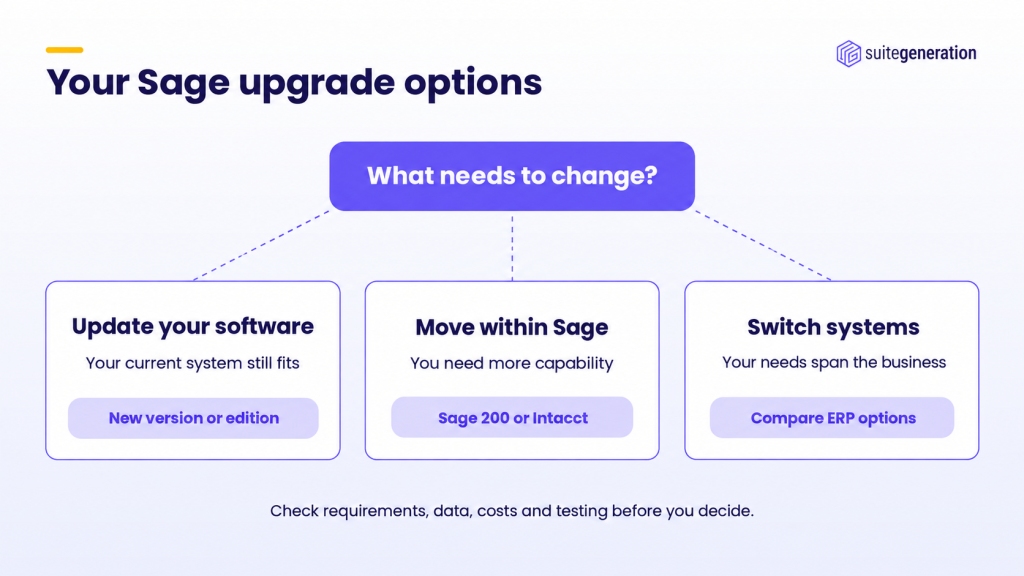
A Sage upgrade can mean updating your current software, moving to another Sage product, or switching systems entirely. The right choice depends on what your business needs to do that its current setup cannot.
If the software still meets your needs, an update may be enough. But if your team relies on spreadsheets, disconnected apps or manual reporting, compare your options before investing further.
We implement NetSuite, so that is the alternative we know best. But moving away from Sage needs a clear business case. This guide covers the three routes and the checks that will help you choose between them.
What should your Sage upgrade solve?
Start with the tasks that take longer than they should. Perhaps someone rebuilds management reports in Excel every month. Stock figures need checking against another app. Or consolidation depends on a spreadsheet only one person understands.
Next, identify what causes each problem. An old version, an awkward setup and a missing feature need different fixes. Training or a better report may help. In other cases, the business needs capabilities its current system cannot provide.
Write down your three biggest problems, how your team handles them today, and what a better result would look like. Use these against each proposed upgrade before you commit to a route.
Option one: update your existing software
Staying with your current product makes sense when it still supports the way your business works. A newer release or different edition may provide the improvement you need.
Check the proposed change against your problem list. Ask which features address each issue, whether your subscription includes them, and what needs configuring. Sage’s version comparison is a useful starting point for Sage 50 Accounts.
Before installing, back up and check your data, and confirm that connected apps will remain compatible. Agree who tests the reports and processes your team depends on.
If an update solves the problem, you may not need to replace the system. If the same workarounds remain, the next two routes are worth a proper look.
Option two: move to another Sage product
A move within Sage can make sense when your current product no longer meets your needs. Choose the destination based on your requirements, not the product name.
Sage 200 is worth evaluating when you need more control over financials, stock, purchasing and sales orders. Sage Intacct belongs on the shortlist when financial management is the priority – multi-entity accounting, consolidation, more flexible reporting. Sage’s product comparison explains the differences between editions.
Treat either move as an implementation project in its own right. You will need decisions about configuration, data, testing and training, and a supplier demonstration using your own difficult processes, not a canned demo.
If Intacct and NetSuite both make your shortlist, our Sage Intacct vs NetSuite comparison examines that choice in more detail. And if it is specifically a Sage 50 vs Sage 200 decision, we cover that head-to-head separately.
Option three: switch to another system
Consider another platform when the problems extend across departments – finance waiting on sales information, purchasing holding separate stock records, reporting depending on reconciling several applications.
NetSuite is one option for connecting finance and operations. Its ERP covers accounting, orders, inventory and purchasing, with further capabilities depending on the modules selected. Oracle’s product overview explains the scope.
Focus on what would actually improve for your team. Could an order move through fulfilment and invoicing with less rekeying? Could finance produce reports without rebuilding them elsewhere? Which specialist apps would still remain?
A move deserves consideration when these improvements justify the cost and effort. Our guide to choosing an ERP system explains how to assess the business case.
Four checks before approving a Sage upgrade
Whether you stay with Sage or switch systems, make these checks before committing.
1. See the complete process
Ask for a demonstration of the work that causes problems today. If it involves orders, stock and finance, see the whole sequence – then establish what comes as standard, what needs configuring, and what requires extra software or custom development.
2. Agree what happens to your data
Define which customer records, supplier records, open transactions and balances will move, and how much history you need. Check attachments and audit history explicitly, and agree who reconciles and approves the migrated figures. Our migration FAQs cover the questions to resolve early.
3. Compare the full cost
The cost of a Sage upgrade can extend well beyond the software. Depending on the route, allow for implementation, data work, integrations, reports, training and ongoing support – including your team’s time and any period when both systems need to stay available. If NetSuite is an option, our cost and pricing guide explains its main cost components.
4. Decide how to test success
Agree specific outcomes before work starts – producing a report without rebuilding it manually, completing an approval process, reconciling migrated balances. Assign someone in your business to sign off each one; clear acceptance criteria make it far easier to judge whether the new setup delivers.
Choose the Sage upgrade that fits your business
The best Sage upgrade gives your business the capabilities it needs at a cost you can justify. That may mean updating your existing setup, moving to Sage 200 or Intacct, or a broader change entirely.
If you are considering NetSuite, our Sage-to-NetSuite migration service explains how we help plan and deliver the move.
Common questions
Does upgrading mean replacing Sage? No. You may only need a newer version or a different edition. Confirm exactly what the supplier means by an upgrade, and which problems it will actually address.
How do I choose between updating Sage 50 and moving to Sage 200? Start with the capability you need, not the product name – then weigh the two directly. We cover that specific comparison, including where the price and feature line sits, in a separate guide. [WP: link this sentence to the Sage 50 vs Sage 200 post once it is live]
Is moving within Sage a simple update? Don’t assume so. Ask for a clear scope covering configuration, data migration, reports, integrations, testing and training.
When should I consider NetSuite? When you need more connected financial and operational processes, and the expected improvement justifies the subscription, implementation and effort of moving.